

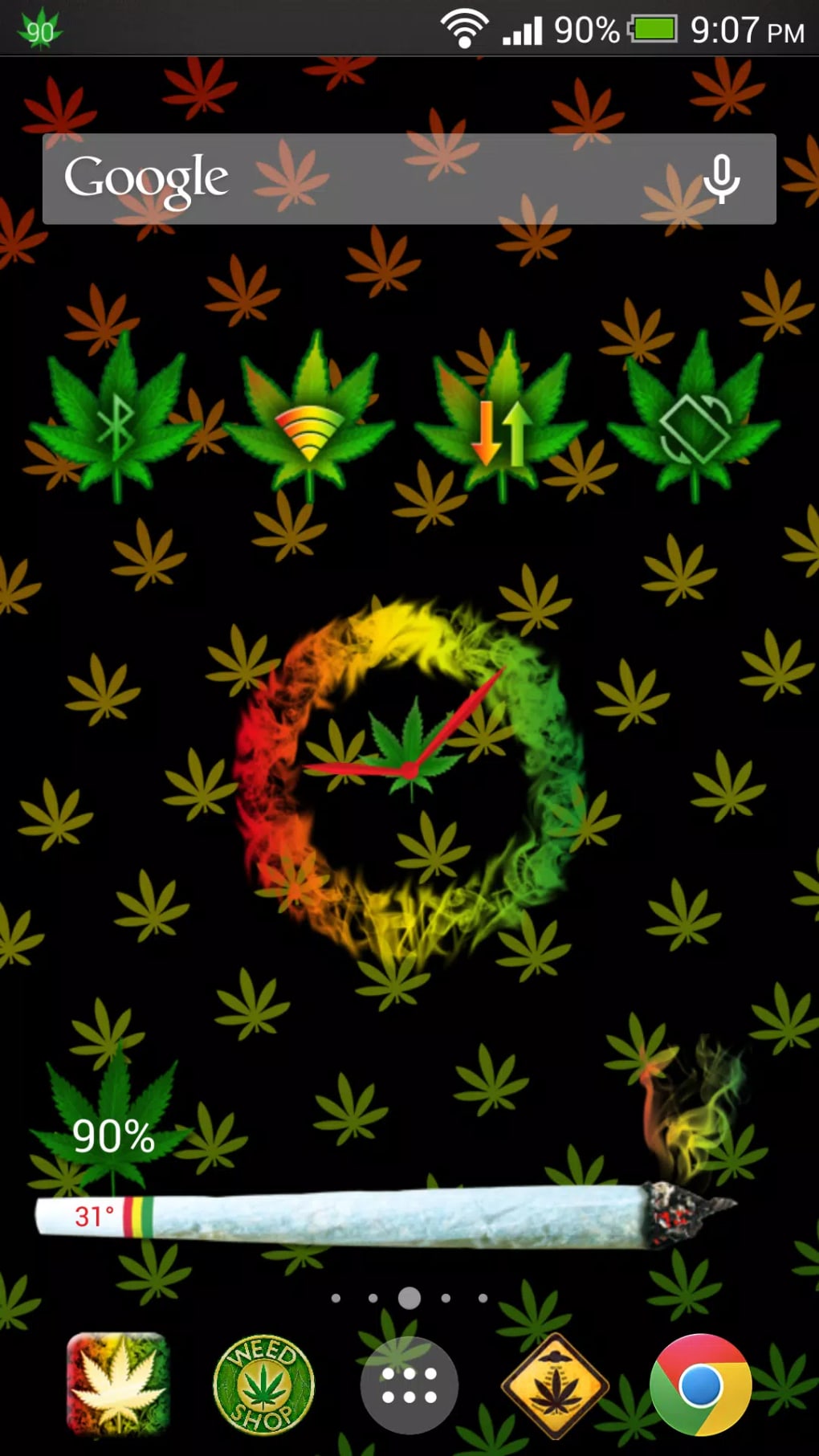


Download Weed Widget Pack – weather widget, customize your phone, customization options, customizable features
Overview
Widely recognized as a personalization tool for Android devices, Weed Widget Pack offers users a streamlined way to enhance their mobile experience through customizable interface elements. Designed to help users tailor their home screen to reflect individual style and functionality, the app focuses on delivering a suite of visual and interactive components. The primary purpose of the software is to allow users to modify their device’s appearance and usability with minimal effort.
Key functions include the integration of a weather widget and various customization tools, enabling users to personalize their phone’s interface with dynamic content. This app is ideal for individuals seeking a fresh, unique look without requiring technical expertise. The developer, Weed Games, positions the app within the Personalization category, emphasizing user-driven design and adaptability.
Real-world usage scenarios include daily weather monitoring through the integrated widget, quick access to frequently used functions, and aesthetic improvements through themed layouts. While the developer did not provide additional details about the app’s background or broader product lineup, its core focus remains on interface personalization and user empowerment.
Key Features & Capabilities
- Weather Widget Integration – Provides real-time weather updates directly on the home screen, allowing users to check conditions at a glance without opening a separate app.
- Customize Your Phone – Offers tools to modify visual elements such as icons, backgrounds, and layout arrangements to reflect personal preferences.
- Customization Options – Includes a range of adjustable settings that let users fine-tune the appearance and behavior of widgets and interface components.
- Customizable Features – Supports user-driven changes to widget size, color schemes, transparency, and placement for greater flexibility in design.
These features are designed to improve both the aesthetic appeal and practicality of the Android interface. For example, users can place the weather widget in a prominent location to monitor forecasts throughout the day, or adjust the transparency of a clock widget to blend seamlessly with their chosen wallpaper. The ability to customize your phone extends beyond mere visuals, enabling users to prioritize frequently used functions through accessible, tailored widgets.
The app’s modular structure allows for selective implementation of features, ensuring that users can adapt the experience to their specific needs. While exact performance metrics were not specified, the app’s lightweight design suggests efficient operation on a variety of Android devices. The focus remains on usability and visual personalization, making it suitable for users who value both form and function in their mobile interface.
User Interface, Workflow & Performance
The user interface of Weed Widget Pack is structured around simplicity and intuitive navigation. The app presents a clean layout that guides users through the customization process with minimal friction. Core functions are accessible via clearly labeled sections, and the workflow for adding or modifying widgets is designed to be straightforward, even for novice users.
Users can preview changes in real time, which enhances the overall experience and reduces trial-and-error adjustments. The app’s performance is expected to be stable given its lightweight footprint of 2.5 MB, though exact resource usage details were not provided. General software behavior patterns suggest efficient CPU and RAM management, especially on modern Android devices.
Stability is likely maintained through regular updates, although specific update frequency was not disclosed. The developer did not specify performance benchmarks or system load under heavy usage. However, the app’s focus on visual customization rather than intensive processing implies minimal impact on device performance.
Overall, the workflow supports a smooth, responsive experience that aligns with user expectations for a personalization tool.
Compatibility & System Requirements
Widely available for Android devices, Weed Widget Pack is compatible with the Android operating system. The app is designed to function across a range of Android versions, though specific version requirements were not listed. Installation size is reported at 2.5 MB, indicating a lightweight footprint that minimizes storage impact.
The developer did not provide detailed hardware requirements, such as minimum RAM or processor specifications. As such, exact system requirements were not listed. Compatibility information was partially provided, with the app’s availability confirmed for Android platforms.
Users are advised to ensure their device meets standard Android app requirements for installation and operation. Given the app’s small file size and focus on interface elements, it is likely to run on most Android devices released in the past several years. However, without official specifications, users should proceed with caution on older or low-end devices.
Pros and Cons
Pros
- Free to download and use, making it accessible to a broad audience.
- Lightweight design with a small installation size of 2.5 MB.
- Offers real-time weather updates through an integrated widget.
- Provides multiple customization options for personalizing the home screen.
- Simple and intuitive user interface suitable for beginners.
Cons
- Exact system requirements were not specified, limiting clarity for potential users.
- Performance behavior under heavy usage was not documented.
- Developer information is limited beyond the name "Weed Games."
- Limited details on update frequency or long-term support.
- May not include advanced customization tools beyond basic visual changes.
FAQ Section
Is Weed Widget Pack compatible with my Android device?
The app is designed for Android devices, but specific version compatibility was not provided by the developer. Users should ensure their device runs a supported Android version for optimal functionality.
Is Weed Widget Pack safe to download and install?
As a free app from a recognized developer, Weed Widget Pack is available through official Android distribution channels. However, users should always download from trusted sources to ensure security.
Does Weed Widget Pack require an internet connection?
The app requires an internet connection to update weather data in real time. Offline functionality is limited to previously cached information.
Can I use Weed Widget Pack without an account?
Yes, the app does not require a user account to access its core features. All customization tools are available immediately upon installation.
How often are updates released for Weed Widget Pack?
Update frequency was not specified by the developer. Users should check the app store for the latest version and improvements.
Final Thoughts + CTA
Widely recognized as a lightweight and accessible personalization tool, Weed Widget Pack delivers on its promise to help users customize their Android experience with ease. Its focus on essential features like the weather widget and customizable interface elements makes it a practical choice for those seeking a fresh, functional home screen. The app’s free pricing model and minimal storage footprint further enhance its appeal.
While detailed technical information is limited, the app’s straightforward design and intuitive workflow support a smooth user experience. It is best suited for casual users and mobile enthusiasts who value visual customization without complexity. For individuals looking to enhance their device’s appearance and usability, Weed Widget Pack offers a reliable, no-frills solution.
Download Weed Widget Pack now.





.png)

